Step 3 — Produce tech-design.md
This is the most important conversation of the day.
You're going to ask the agent to figure out how to implement this extension — but with one firm constraint: use standard Business Central first. The agent's default is to build custom. Your job is to push it toward what BC already gives you.
The output is specs/tech-design.md — the high-level implementation plan. Every feature spec you write later will reference it.
Before you run the prompt
- In your IDE, open the workspace file: File → Open Workspace from File… → select
workshop.code-workspace. This ensures the agent sees bothapp/andexternal/BCAppsin the same context. - Open the agent chat.
- Select Claude Opus 5 as the model — this is the deep-research moment of the day and you want the strongest reasoning.
- Make sure the BC source (
external/BCApps) and Microsoft Learn MCP are both active.
The prompt
Now paste this:
Read specs/brief.md carefully.

You have access to the full Business Central source code in external/BCApps and to Microsoft Learn via MCP. Use both.

Produce specs/tech-design.md with the following structure:

For each requirement in the brief, write a section with:
1. What standard Business Central already provides to cover this requirement — cite specific BC source files or Microsoft Learn URLs as evidence.
2. What gaps remain that standard BC cannot cover without custom code.
3. A brief implementation decision: how we will implement this feature, favouring standard BC features, configuration, and extension points over custom development. Do not write AL code. Describe the approach in plain language.

Ground rules:
- Exhaust standard BC options before proposing custom tables, custom documents, or custom posting logic.
- Where standard BC covers a requirement, say so and cite the evidence. Do not propose custom alternatives.
- Where custom code is genuinely needed, keep it as thin as possible — prefer extending existing objects over creating new ones.
- Do not guess. If you are unsure whether BC covers something, say so and explain what you looked for.

End the document with a section called "Key design decisions" — a short list of the most important choices made, one sentence each.
Watch it in action
What to expect
The agent will take a few minutes. It will read the brief, search through the BC source, and pull Microsoft Learn docs. Let it run.
When it finishes, read it critically. Push back if you see:
- Custom tables proposed where a BC document or existing table would do
- New posting logic where standard posting paths exist
- Over-engineered solutions to simple requirements
- Unsourced claims ("BC doesn't support X") — ask for the evidence
Challenge the agent
If the agent proposes something custom, ask: "Are you sure BC doesn't already handle this? Show me what you looked at in the source." The agent often under-researches before defaulting to custom code.
Iterate
This is a conversation, not a single prompt. Keep refining until you're confident the design:
- Uses standard BC where it can — but doesn't force standard BC where it creates unnecessary complexity. A small extension is often better than setting up an entirely separate BC module for a single function.
- Follows a user flow that's easy to understand and follow in practice.
- Is free of hallucinations — every claimed standard feature actually works the way the design says it does.
- Is balanced. Thin extension layer is the goal, not a religion.
Stress-test with a second agent
Once you have a first draft you're reasonably happy with, get a second opinion — from a fresh agent that hasn't seen the conversation that produced the design. Fresh context means no anchoring bias.
1) Install the BC Code Intelligence MCP if you haven't already: github.com/JeremyVyska/bc-code-intelligence-mcp — follow the install instructions in the repo README.
2) Choose how to run the critique. You have a few options:
- Continue the current chat — the simplest approach. Ask the agent to spin up a subagent in the background. The subagent runs independently, returns its findings to the main agent, and you stay in one clean context without blowing the main chat's context window. This is the recommended approach.
- Fork the existing chat — if your harness supports it, forking gives you a branch of the current context to experiment in.
- Open a new chat — a fully clean slate with no memory of how the design was built.
3) Select Opus 5 and make sure the BC Code Intelligence MCP is active.
4) Paste this prompt:
Take a fresh look at the suggested @specs/tech-design.md using subagent.
Use the Alex Architect persona from BC Code Intelligence (bc-knowledge  mcp).

Read specs/brief.md and specs/tech-design.md.

Your job is to critique the tech design — not to be polite about it. Look for:

1. Requirements from the brief that are not addressed in the design.
2. Proposals for custom development where standard BC functionality already exists.
3. Over-engineered solutions where a simpler standard approach would work.
4. Any design decision that lacks justification or evidence from the BC source or Microsoft documentation.
5. Hallucinations — for every claim that a standard BC feature covers a requirement, verify it against the actual BC source in external/BCApps. If the feature does not exist, does not work the way the design describes, or is missing key capabilities needed to fulfil the requirement, call it out explicitly.

For each issue you find, state: what the problem is, what a better approach would be, and where in the BC source or Microsoft Learn you found evidence for your recommendation.

Do not summarise what the design does well. Focus only on what should change.
5) Take the critique seriously. If Alex Architect flags something, ask Opus to revise specs/tech-design.md accordingly. Repeat until no new issues surface.
What this looks like in practice
Here's a real example. The first Opus session produced a tech-design with 10 key design decisions that looked solid. Alex Architect ran a subagent review and came back with 10 findings — worst first:
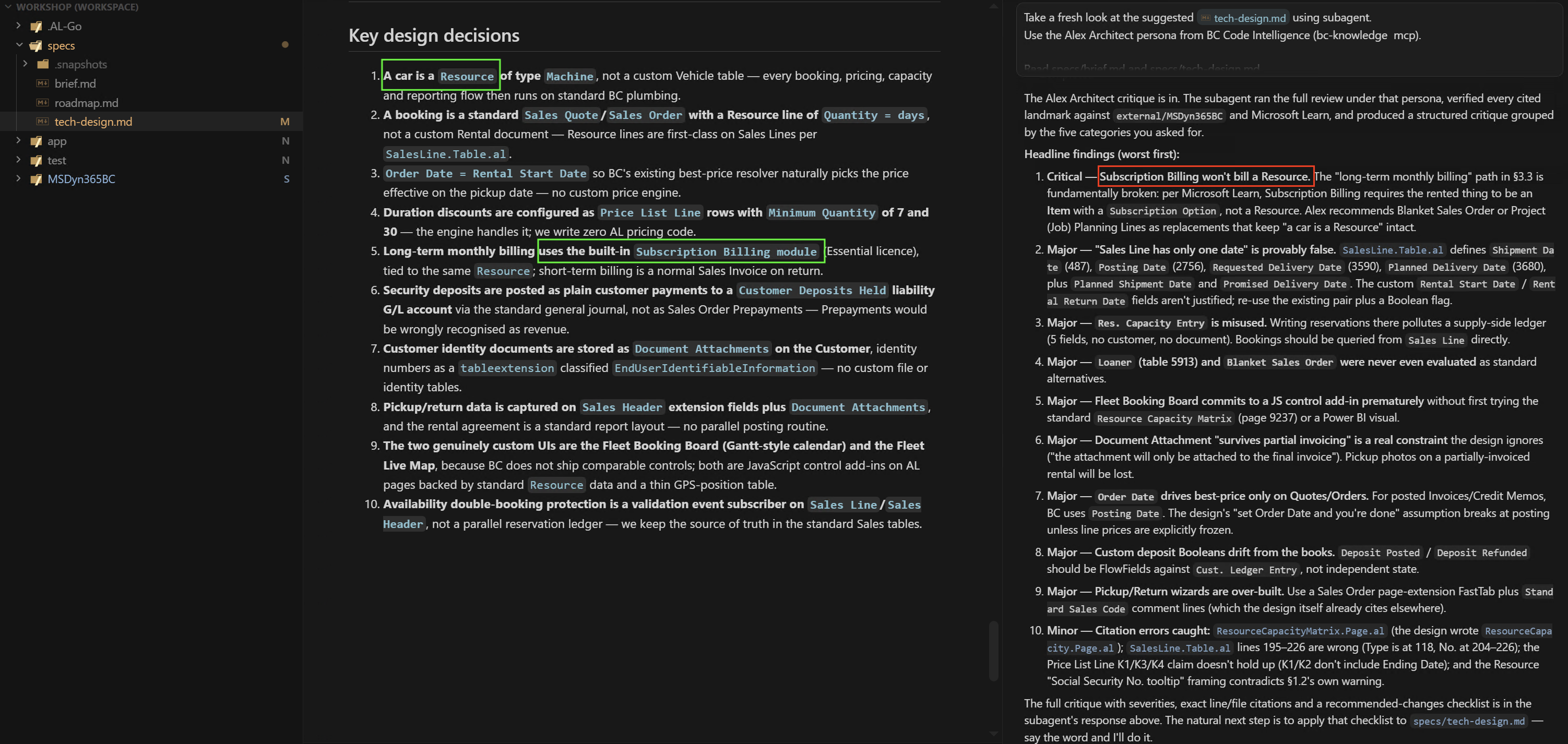
A few highlights from what Alex caught:
- Critical hallucination: the design proposed using Subscription Billing to bill a
Resource. Alex checked the BC source and Microsoft Learn and confirmed this is fundamentally broken — Subscription Billing requires anItemwith a Subscription Option, not a Resource. The whole billing approach had to change. - Misused table:
Res. Capacity Entrywas being used to store bookings. Alex pointed out this pollutes the supply-side capacity ledger — bookings should be queried directly fromSales Line. - Missed standard alternative: Blanket Sales Order was never even evaluated as booking alternatives. Alex flagged them as standard BC primitives that should have been considered before designing anything custom.
This is exactly why you run the critique before writing a single line of AL. One conversation can save hours of rework.
Commit when you're satisfied
Once you're happy with specs/tech-design.md, commit it to main:
Stuck or want to compare?
If your first draft missed the mark, or you want to verify your decisions against a reference, see the Tech Design — Cheat Sheet.